What is Dolibarr ERP?
Dolibarr ERP & CRM is a modern, open-source business management platform built in PHP. Used by millions of businesses worldwide, it provides a modular suite of tools for managing contacts, quotes, invoices, orders, inventory, projects, HR, accounting, and more. Unlike monolithic ERP systems like SAP or Oracle, Dolibarr lets businesses enable only the modules they need, making it lightweight, scalable, and ideal for small-to-medium enterprises that require enterprise-grade functionality without the complexity or licensing costs.
Dolibarr supports MySQL, MariaDB, and PostgreSQL databases and runs on any standard LAMP/WAMP/LEMP stack. Its modular architecture, active open-source community (20+ years of development), and extensibility through custom modules and hooks make it a compelling alternative to proprietary solutions like SAP Business One, Odoo, or QuickBooks Enterprise. For businesses that need deep customization without vendor lock-in, Dolibarr in 2026 remains one of the strongest options in the open-source ERP space.
Dolibarr: strengths and limitations
Strengths
- Zero licensing cost - fully open-source under GPL
- Modular by design - activate only what you need
- PHP-native - runs on standard web hosting, matches WordPress stacks
- Extensible - hooks, triggers, and a marketplace of third-party modules
- No vendor lock-in - you own the data, the code, and the infrastructure
Limitations
- Requires PHP expertise - production deployment demands custom development
- Localization gaps - non-English markets need deeper customization beyond language packs
- UI is functional, not modern - the admin interface works but lacks polish
- Known pricing bugs - TTC/HT price handling issues are well-documented in the Dolibarr GitHub tracker, affecting invoices, orders, and WooCommerce sync
- Smaller community than Odoo - fewer ready-made modules and integrations
The challenge
The client operated a growing WooCommerce store in the home and decor space but managed all back-office operations manually. Invoices were created by hand. Inventory lived in spreadsheets. Data was entered twice, once in WooCommerce and once in the accounting system. As order volume grew, this approach hit a wall.
- No centralized ERP. Orders, invoices, and inventory lived in disconnected systems with no single source of truth.
- Romanian compliance requirements. Invoices and business documents needed Romanian-language support, RON currency formatting, and locally compliant delivery terms.
- WooCommerce data isolation. Product catalog, customer data, and order history were trapped in WooCommerce with no way to feed into proposals, invoices, or stock management.
- Pricing inconsistencies. Tax-inclusive (TTC) pricing in WooCommerce conflicted with tax-exclusive (HT) pricing conventions in ERP accounting, causing calculation errors.
- PDF document quality. Auto-generated business documents needed to look professional, display correctly in Romanian, and include proper company branding.
- Scalability. The solution needed to handle growing product catalogs, increasing order volumes, and potential multi-channel expansion.

Phase 1: ERP selection and deployment
After evaluating Odoo, ERPNext, and Dolibarr, we selected Dolibarr for this project. The deciding factors: zero licensing cost under GPL, a modular architecture that lets the client activate only the features they need (CRM, invoicing, orders, stock, proposals), a PHP-native stack that matches the existing WooCommerce/WordPress infrastructure, and a robust hook and trigger system for custom integrations.
We deployed Dolibarr on the client's hosting infrastructure with MariaDB, configured HTTPS, CSRF protection, and proper access controls from day one. The ERP was running in production within 48 hours of the initial deployment.
Phase 2: Romanian localization and 120+ customizations
Dolibarr supports Romanian as a language out of the box. But real-world Romanian business use required far deeper work. Over the course of this project, we implemented over 120 individual customizations, patches, and bug fixes across the ERP, the integration layer, and the document generation system.
Document generation (custom PDF templates)
- Built custom PDF templates for proposals, orders, invoices, and shipping documents
- Added "Valori in moneda RON" (Values in RON currency) headers across all document types
- Implemented a
removeDiacritics()function to handle Romanian characters (ă, â, î, ș, ț) that caused rendering issues in PDF fonts - Centered description column headers and changed text alignment from justified to left-aligned for readability
- Added clickable website URLs with proper formatting in document headers and footers
Business logic customization
- Replaced default English delivery availability options with Romanian terms (Imediat, 24/48h, 3-5 zile, 7-10 zile)
- Installed and configured the subtotal module to support section headers and subtotals in proposals, orders, and invoices
- Installed the split module to enable drag-and-drop line management across draft proposals
- 5 custom modules total: ecommerceng, subtotal, split, abricot, and customopt

Phase 3: WooCommerce integration
This was the most complex and critical phase. We deployed and configured the eCommerceng module (v4.1.69) to create a bidirectional sync bridge between WooCommerce and Dolibarr.
What gets synchronized
- Products - catalog, prices, descriptions, variants, attributes, categories
- Customers - third-party records, contacts, addresses
- Orders - WooCommerce orders automatically create Dolibarr orders
- Invoices - auto-generated from synced orders
- Stock levels - real-time inventory sync (configurable direction)
Technical infrastructure
- OAuth1-authenticated API connection to WooCommerce REST API
- Webhook receiver for real-time event processing (order placed, product updated, stock changed)
- 4 automated cron jobs running every 15 minutes for webhook processing, status monitoring, and stock synchronization
- 14 custom database tables mapping Dolibarr entities to WooCommerce remote IDs
- Tax rate and tax class mapping between platforms
- Payment gateway mapping for order status workflows
Phase 4: critical bug fixes and price calculation patches
During integration testing, we discovered and resolved several pricing bugs that would have caused financial discrepancies. These were not configuration issues. They were bugs in the calculation logic that required patching core classes.
The unit price storage bug
When a product with a discount was added to a proposal, order, or invoice, Dolibarr's default behavior stored
the calculated (post-discount) unit price in the subprice field. But the discount percentage
was stored separately. This meant the displayed "unit price" on documents appeared lower than intended, making
it look like the business was charging less than the actual rate.
Solution: We patched the addline() and updateline() methods across three
core classes (proposals, orders, invoices) to store the original unit price before discount, ensuring
documents display the correct price with the discount shown separately.
The double taxation bug
WooCommerce uses tax-inclusive (TTC) pricing, but Dolibarr's document engine expected tax-exclusive (HT) base prices. When products synced from WooCommerce, the TTC price was treated as HT, and tax was applied again, inflating totals.
Solution: We implemented a fix in the synchronization layer that forces
price_base_type = 'HT' after product import, ensuring the net price is used as the
calculation base.
The order total rounding bug
Floating-point arithmetic caused order totals to drift from the sum of line items by fractions of a cent. Small enough to be invisible on individual lines but visible on the total. For a business generating invoices in RON, even 0.01 RON discrepancies are unacceptable.
Solution: Added a consistency check that recalculates line totals directly from
subprice * qty when no discount is applied, bypassing the intermediate calculation
that introduced rounding errors.
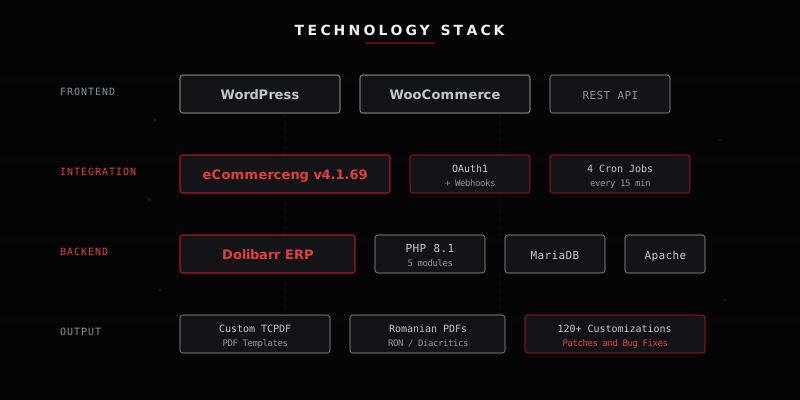
Technology stack
Key technical takeaways
- Open-source does not mean zero effort. Dolibarr is powerful and free, but production deployment for a specific market requires deep PHP customization, careful testing, and understanding of both the ERP's internals and local business requirements.
- WooCommerce-ERP integration is a solved problem, with caveats. The eCommerceng module provides excellent bidirectional sync, but tax model differences between platforms (TTC vs. HT) require custom fixes that no off-the-shelf plugin covers.
- Price calculations are deceptively complex. When two systems each apply their own rounding, discounting, and tax logic, sub-cent discrepancies compound. Every calculation path must be audited end-to-end.
- PDF generation for non-Latin scripts needs attention. Romanian diacritics broke PDF rendering in multiple templates. A systematic approach (global utility function plus per-template integration) was needed.
- Webhooks over polling for real-time sync. The webhook-based architecture processes WooCommerce events in near-real-time, keeping inventory and order data fresh without hammering either platform's API.
Who is this solution for?
This architecture is ideal for e-commerce businesses running WooCommerce that need back-office ERP capabilities without SaaS subscription costs. Companies in Romania or Eastern Europe that need locally compliant invoicing, RON currency support, and Romanian-language documents. Growing businesses that have outgrown spreadsheets and manual processes but are not ready for SAP or Oracle. And multi-channel retailers that need a single source of truth for inventory, customers, and financial documents across online and offline channels.
Need a similar ERP integration?
Whether you need a Dolibarr deployment, WooCommerce integration, custom invoicing workflows, or migration from another ERP, we have solved these problems before.