
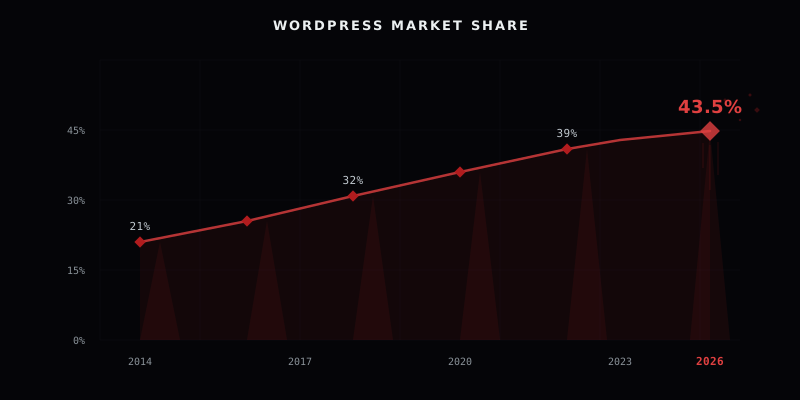
Every year, someone declares WordPress dead. A new framework launches, a new page builder goes viral, and the tech press writes the obituary. Every year, the numbers say otherwise. WordPress powers 43.5% of every website on the internet. Not 43.5% of CMS-driven sites. 43.5% of all websites. And that number keeps climbing.
We build on WordPress. We also build on other platforms when the project calls for it. This article is not a love letter. It is a data-driven assessment of where WordPress stands in March 2026, what changed with the arrival of AI-native tools, and why we continue to recommend it as the default starting point for most business websites.

The numbers don't lie
WordPress holds 62.7% of the entire CMS market. The second largest platform, Shopify, accounts for roughly 5.1%. That is not a competition. That is a category of one.
The growth trajectory tells the real story. In 2014, WordPress powered 21% of all websites. By March 2026, that figure has more than doubled to 43.5%. Over 63 million websites run on WordPress today. The platform's market share is three times larger than the combined usage of the next nine most popular website builders and CMS platforms.
This is not legacy momentum from sites built ten years ago and never updated. WordPress releases major versions multiple times per year. Version 6.7 alone shipped 1,264 enhancements and bug fixes. The ecosystem of themes, plugins, and developer tools continues to expand. Active development, active growth, active adoption.
When a platform holds nearly half the web after two decades of competition from billions in venture-backed alternatives, the question is no longer whether it is relevant. The question is why anyone would bet against it.
WooCommerce: the e-commerce platform nobody talks about
Shopify dominates the e-commerce conversation. The marketing is excellent, the IPO made headlines, and every second YouTube ad seems to feature a Shopify success story. Fair enough. But the numbers paint a different picture.
WooCommerce powers between 30% and 38% of all e-commerce websites globally, depending on the measurement methodology. That is approximately 6.5 million live stores processing an estimated $35 billion in annual sales, with projections reaching $40 to $45 billion by mid-2027. The platform operates in over 200 countries.
The cost structure is where WooCommerce separates itself. Shopify charges $39 to $399 per month depending on the plan, and adds a 0.5% to 2.0% transaction fee on every sale if you do not use Shopify Payments. That fee compounds fast. A store doing $20,000 per month on Shopify Basic is paying $400 in transaction fees alone, on top of the $39 monthly subscription.
WooCommerce charges zero platform transaction fees. You pay your payment gateway's processing fee and your hosting costs. That is it. For a small to mid-size business, the savings over 12 months can fund an entire redesign.
There is a crossover point. When monthly revenue exceeds roughly $50,000 and the business prefers managed simplicity over granular control, Shopify's all-in-one model can make financial sense. Below that threshold, WooCommerce wins on cost, data ownership, and customization. You own the server, you own the database, and you own every line of code running your store. For a detailed comparison of WooCommerce against eight other e-commerce platforms, see our e-commerce platform comparison.

What we have learned from building on WordPress
Statistics make the case for WordPress as a platform. But numbers on a screen are not the same as years of building production sites, debugging payment flows at 2 AM, and handing a finished project to a client who has never used a CMS before. Here is what we have learned from doing this work for years.
The strengths
- Endlessly customizable. Custom post types, REST APIs, headless configurations, full-scale web applications. We built a complete learning management system as a single WordPress plugin: courses, WooCommerce payments, Zoom integration, homework submission, automated diplomas, and a security audit that resolved 86 issues. That was one project. WordPress handled all of it. In another, we wired a WooCommerce storefront directly into a Dolibarr ERP, so stock, orders, and invoicing stay in sync automatically.
- Secure when done right. WordPress core receives regular security patches and has a dedicated security team. The vulnerabilities that make headlines come from neglected updates, poorly coded plugins, and lazy server configurations. A properly hardened WordPress site with managed hosting, a web application firewall, and a disciplined update schedule is as secure as any platform on the market.
- Easy client hand-off. Clients manage their own content from day one. The admin interface is familiar enough that training takes hours, not weeks. This matters more than most developers realize. A beautiful website that the client cannot update independently is a website that goes stale within months.
- Perfect for marketers. Nearly every marketing tool integrates natively. HubSpot, Mailchimp, ActiveCampaign, Google Tag Manager, Meta Pixel, heatmaps, A/B testing platforms. The plugin ecosystem covers every integration a marketing team could need, and most of them install in under five minutes.
- Exceptional for SEO. Plugins like Yoast and Rank Math provide structured data, XML sitemaps, and content analysis out of the box. Clean permalink structures, server-side rendering by default, and full control over meta tags and schema markup. WordPress sites consistently rank well because the platform was built for content from the ground up.
- Built for Google Ads. Official Google integration, a fully customizable Data Layer for both WooCommerce and standard WordPress, conversion tracking, enhanced e-commerce events, and dynamic remarketing feeds. For paid acquisition campaigns, WordPress and WooCommerce provide the most flexible and granular tracking setup available today. If you want that stack run correctly, our Google Ads management team handles setup, tracking, and optimization end to end.
The honest downsides
- Incredibly difficult to do right. The entry barrier is low. The ceiling is sky-high. Anyone can install WordPress. Very few can build a WordPress site that is fast, secure, scalable, and maintainable over time. The gap between a mediocre WordPress site and a properly engineered one is not a gap. It is a canyon.
- Requires continuous maintenance. Plugin updates, core updates, PHP version upgrades, security monitoring, database optimization, backup verification. WordPress is not a "set and forget" platform. But when maintained with discipline, it is remarkably stable. We have client sites that have been running for years without a single downtime incident.
- Can be expensive to set up and host. Managed WordPress hosting ranges from $30 to $150 per month. Premium themes and plugins add up. Professional development costs significantly more than drag-and-drop page builders. The total investment varies wildly based on project scope, but the return is typically proportional.
- Requires specialized knowledge at scale. PHP, MySQL, server configuration, caching layers, CDN architecture, security hardening. Scaling WordPress for high-traffic environments is an engineering discipline. It is not a checkbox in a hosting panel.
- Custom coding for advanced features. The plugin ecosystem covers roughly 80% of common requirements. The remaining 20% demands a developer who understands WordPress internals, hook architecture, and database patterns. The platform provides an exceptionally solid foundation, but building on that foundation requires real expertise.
WordPress is not a shortcut. It is a professional tool. In the hands of someone who knows what they are doing, it produces results that no page builder or SaaS platform can match. In the wrong hands, it produces the sites that give WordPress its bad reputation.

WordPress 7.0 and the AI question
The most common argument against WordPress in 2026 goes something like this: "AI is changing everything, and WordPress is too old to keep up." The data says the opposite.
WordPress 7.0 is scheduled for release on April 9, 2026. It is the most significant update in the platform's history. The headline feature is the WP AI Client, a native AI infrastructure layer built directly into WordPress core. Not an optional plugin. Not a third-party integration. A core component.
The new Connectors UI in the admin dashboard lets site owners manage AI provider connections from a central location under Settings. Plugins and themes can tap into any AI model through this standardized layer. Content generation, image processing, automated workflows, and intelligent search are becoming first-class WordPress features.
The plugin ecosystem was already ahead of core. AI Engine, one of the most popular AI plugins, connects WordPress with ChatGPT, Claude, Gemini, and other models. It enables chatbots, content generation, AI-powered forms, and automated content workflows. WordPress.com now includes a built-in AI Assistant for Business and Commerce plans.
Beyond AI, WordPress 7.0 introduces real-time collaborative editing (similar to Google Docs), a redesigned admin interface using DataViews, client-side media processing that reduces server load, and raises the minimum PHP requirement to 7.4.
WordPress has survived and absorbed every technology shift of the past two decades: responsive design, mobile-first, REST APIs, headless architecture, the JavaScript framework explosion, and now AI. The pattern is consistent. The platform adapts, integrates, and moves forward. Betting against that pattern requires a strong counterargument. We have not seen one yet.

So why isn't this website built on WordPress?
Fair question. We recommend WordPress to our clients, we build custom WordPress plugins, and we just spent several thousand words defending the platform. Yet apexdigital.ro runs on Astro, a static site generator, deployed to shared cPanel hosting.
The answer is simple: hosting costs.
This website is a portfolio and branding site. It has no user accounts, no e-commerce, no dynamic content that changes based on who is viewing it. Every page is pre-built at compile time and served as static HTML. The server does not run PHP. There is no MySQL database. There is no WordPress admin panel.
The result is a site that loads in milliseconds, costs a fraction of what managed WordPress hosting would require, and has zero server-side attack surface. For this specific use case, a static build is the right tool.
But this is the exception, not the rule. The moment a project needs a content management system, user authentication, e-commerce, dynamic data, or the ability for a non-technical client to update their own website, WordPress becomes the default recommendation. Our custom LMS project is a concrete example: an entire learning platform, payment system, and content delivery engine, all running on WordPress.
The best technology choice matches the project's actual requirements, not the developer's preferences. We build on WordPress, Astro, custom stacks, and everything in between. The project decides. We execute.

When WordPress is the wrong choice
We would be doing you a disservice if we pretended WordPress is the answer to everything. It is not.
WordPress is the wrong choice for static marketing sites with no CMS requirements. If nobody will ever log into an admin panel to edit content, the overhead of a WordPress installation is unnecessary. A static site generator will be faster, cheaper to host, and simpler to maintain.
It is the wrong choice for pure web applications. If you are building a SaaS product, a real-time collaboration tool, or a data-intensive dashboard, WordPress's content-first architecture will fight you at every step. Use a framework designed for application development.
It is the wrong choice for very high-traffic sites where static generation provides meaningful cost savings. If your site serves millions of pageviews per month and every page is identical for every visitor, the compute cost of running PHP on every request adds up. Static builds at the edge eliminate that cost entirely.
These are real scenarios. They are also edge cases. The vast majority of business websites, online stores, and content platforms fit squarely within what WordPress does best.
What we tell our clients
Start with WordPress unless there is a specific, measurable reason not to.
The ecosystem is unmatched: over 59,000 plugins, themes for every industry and use case, and a developer talent pool that dwarfs any other CMS. Hosting is commodity-priced. The learning curve for content editors is gentle. And every major marketing, analytics, and advertising platform integrates with it natively.
For e-commerce, start with WooCommerce unless monthly revenue exceeds $50,000 and the team specifically prefers managed simplicity over control and ownership. Below that threshold, WooCommerce's zero platform fees, full data ownership, and deep customization capability make it the stronger financial and technical choice.
The AI tools are already here. WordPress 7.0 makes them native. The developers who dismissed WordPress as "legacy technology" five years ago are now watching it integrate the same AI capabilities they thought would replace it.
We do not chase trends. We make decisions based on data and results, not trend cycles. WordPress has been the right call for two decades. The data, the ecosystem, and the roadmap all point in the same direction: it will be the right call for years to come.
Frequently asked questions
What is the WordPress market share in 2026?
WordPress powers 43.5% of all websites on the internet in 2026, which equals 62.7% of the CMS market. Over 63 million websites run on WordPress. The platform's market share is three times larger than the combined usage of the next nine most popular website builders and CMS platforms.
Is WordPress still relevant in 2026?
Yes. WordPress powers 43.5% of all websites and its market share continues to grow from 21% in 2014. WordPress 7.0, releasing April 2026, introduces native AI capabilities including the WP AI Client, real-time collaborative editing, and a redesigned admin interface. The ecosystem includes 59,000+ plugins and the largest developer talent pool of any CMS.
What is new in WordPress 7.0?
WordPress 7.0, scheduled for April 9, 2026, introduces the WP AI Client, a native AI infrastructure layer built into WordPress core. It includes a Connectors UI for managing AI provider connections, real-time collaborative editing similar to Google Docs, a redesigned admin interface using DataViews, client-side media processing, and raises the minimum PHP requirement to 7.4.
Is WooCommerce better than Shopify?
For stores under $50,000 monthly revenue, WooCommerce wins on cost due to zero platform transaction fees, full data ownership, and deep customization. WooCommerce powers 6.5 million live stores processing $35 billion annually. Above $50,000 monthly revenue, Shopify's managed infrastructure may justify the premium if the business prefers simplicity over control.
When should you not use WordPress?
WordPress is the wrong choice for static marketing sites with no CMS requirements (use a static site generator instead), pure web applications like SaaS products or real-time tools (use an application framework), and very high-traffic sites serving millions of pageviews where every page is identical (static builds at the edge eliminate compute costs).
Need a WordPress site that performs like a premium product?
We build WordPress websites, WooCommerce stores, and custom plugins. We also offer WordPress mentorship for teams who want to do it right.

