
In our last article, we made the case for WordPress. 43.5% of the web. $35 billion in WooCommerce sales. A platform that has absorbed every technology shift for two decades. We stand by every word. But here is what we did not say: WordPress market share has been declining.
From 65.2% of the CMS market in 2022 to 60.2% in 2026. Still dominant. Still the default for most projects. But the gap is narrowing. SaaS website builders are growing at 32.6% year-over-year. New platforms are solving problems that WordPress requires plugins, developers, and maintenance to address. For certain projects, certain teams, and certain budgets, the best choice is no longer WordPress.
This site runs on Astro. We build client sites on WordPress. We have used Shopify, Webflow, and Ghost for specific projects. We pick the right tool. This article explains how we decide, and it covers the fourteen platforms we consider most seriously in 2026.

When WordPress is not the answer
We covered the edge cases in our WordPress deep-dive. Here is the expanded version. WordPress is the wrong choice in five clear scenarios.
Static sites with no CMS. If nobody will ever log into an admin panel, the overhead of WordPress - PHP, MySQL, security updates, plugin management - is unnecessary weight. A static site generator delivers faster pages, cheaper hosting, and zero server-side attack surface.
Pure web applications. SaaS products, real-time collaboration tools, and data dashboards need application frameworks, not content management systems. WordPress's content-first architecture fights you when the project has nothing to do with content.
Performance-critical high-traffic sites. Millions of identical pageviews per month where every millisecond of Time to First Byte matters. Edge-deployed static builds eliminate PHP compute entirely.
Budget under $2,000 with a two-week timeline. WordPress done right takes time and expertise. If the budget cannot accommodate professional development and the deadline is aggressive, a managed SaaS builder gets a functional site live faster. The ceiling is lower, but the floor is higher.
Teams with zero technical capacity. If nobody on the team can update plugins, manage hosting, or troubleshoot a white screen, a fully managed platform removes that operational burden entirely. WordPress is a professional tool. It requires professional maintenance.
These are not hypothetical edge cases. We encounter them regularly. The question is: what do you use instead?
The platforms, ranked by use case
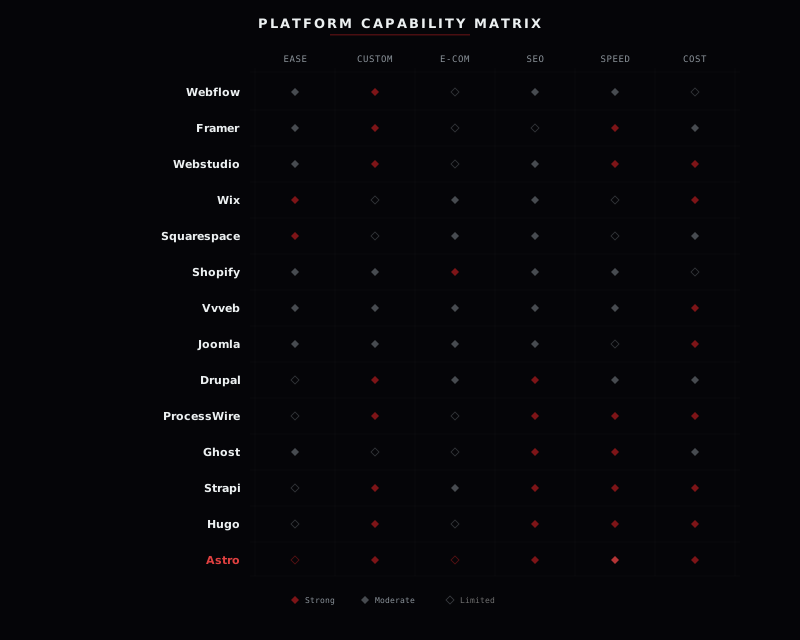
We evaluated fourteen platforms across six dimensions: ease of use, customization depth, e-commerce capability, SEO potential, raw performance, and total cost at scale. No affiliates. No sponsorships. Just what we have seen work - and what we have seen fail - across years of client projects.
Webflow
Design-first visual development. Webflow gives designers pixel-level CSS control through a visual interface. No abstraction layers, no shortcodes, no fighting a theme. You design directly in the browser and Webflow generates clean, semantic HTML and CSS.
The built-in CMS handles structured content well enough for marketing sites, portfolios, and blogs. Hosting is included with automatic SSL, CDN, and backups. For designer-led teams building marketing sites, Webflow can move from concept to production faster than any WordPress workflow.
The limitations are real. Pricing scales poorly: site plans run $14 to $39 per month, CMS plans $23 to $39, and e-commerce plans $29 to $212. E-commerce capabilities are basic compared to WooCommerce or Shopify. And you are locked into Webflow's ecosystem - there is no "export and host elsewhere" escape hatch. Typical Lighthouse scores: 70 to 85, depending on page complexity.
Framer
Motion-native, prototyping-to-production. Framer started as a prototyping tool and evolved into a legitimate website builder. Its strength is animation and interaction design. Transitions, scroll effects, and micro-interactions that would take hours of custom code in other platforms are built into Framer's visual editor.
The output is lightweight. Framer generates optimized static pages that typically score 85 to 95 on Lighthouse. AI-assisted layout generation accelerates the starting point. For startups, landing pages, and design-heavy one-pagers, it is the fastest path from idea to live site.
The CMS is basic. E-commerce does not exist. Content-heavy sites with hundreds of pages will outgrow Framer quickly. It is a specialist tool, not a general-purpose platform. Use it for what it does brilliantly. Do not force it into roles it was not designed for.
Webstudio
Open-source visual builder. Webstudio is the open-source answer to Webflow's lock-in problem. It gives you full visual CSS control -every property, every unit, every breakpoint -through a browser-based editor that generates clean, standards-compliant output. Design tokens and CSS variables let you build a proper design system without writing a line of code.
Where Webstudio gets interesting is its headless-first architecture. It connects natively to Ghost, Strapi, Notion, and Airtable as content backends, meaning you pick your CMS and Webstudio handles the visual layer. Publishing goes through Cloudflare, so sites are edge-deployed by default. No vendor lock-in. No proprietary hosting. If you outgrow Webstudio, your content lives in systems you already control.
The ecosystem is smaller than Webflow's. Templates are limited. The project is maturing rapidly but is still early-stage compared to established players. If you have design skills or CSS knowledge, Webstudio is the most promising visual builder we have seen in years. Typical Lighthouse scores: 85 to 95.
Wix
The fastest-growing all-in-one builder. Wix grew 32.6% year-over-year - the fastest growth rate of any platform in the CMS market. The AI site builder generates a complete website from a text prompt in under a minute. Built-in email marketing, booking systems, CRM, and analytics eliminate the need for third-party integrations.
For small businesses that need everything in one place without technical expertise, Wix delivers. The pricing is straightforward: $17 to $159 per month with no hidden fees. The learning curve is gentle.
The trade-offs are significant. Code export is impossible - your site lives on Wix forever. SEO has a ceiling compared to custom-built sites. Design flexibility depends heavily on templates. Performance is the weakest point: typical Lighthouse scores of 50 to 70 due to heavy JavaScript runtime overhead. For businesses where page speed directly impacts revenue, this matters.
Squarespace
Beautiful defaults for non-technical users. Squarespace templates are the best-looking out-of-the-box designs in the website builder market. Period. For creatives, restaurants, photographers, and service businesses that prioritize visual presentation, Squarespace delivers a polished result with minimal effort.
Integrated scheduling, basic e-commerce, and email campaigns cover most small business needs. Plans range from $16 to $52 per month. The platform grew 9.7% year-over-year, slower than Wix but steady.
Customization is limited compared to any open-source platform. There is no plugin ecosystem. Performance is the weakest in this comparison: typical Lighthouse scores of 40 to 65. If your business depends on organic search traffic and page speed, Squarespace will hold you back.
Shopify
E-commerce at scale. Shopify holds 6.8% of the CMS market and dominates the hosted e-commerce segment at roughly 26%. The checkout is optimized by a team that has processed billions in transactions. The app ecosystem is deep. POS integration, omnichannel selling, inventory management, and international commerce are native features.
In our WordPress article, we said WooCommerce wins under $50,000 per month in revenue. We stand by that. WooCommerce charges zero platform transaction fees. Below $50K, the savings are substantial. Above that threshold, Shopify's managed infrastructure, checkout optimization, and operational simplicity earn their premium. Plans run $39 to $399 per month, plus 0.5% to 2.0% transaction fees if you do not use Shopify Payments.
Content management is Shopify's weak point. The blogging engine is basic. Customization beyond themes requires Liquid templating knowledge. Typical Lighthouse scores: 55 to 75. For a deeper dive into e-commerce platforms specifically, including WooCommerce, Shopify, and seven alternatives, see our dedicated e-commerce comparison.
Vvveb
Free, open-source CMS and e-commerce. Vvveb is what WordPress might look like if it were designed from scratch today. A fully open-source, self-hosted platform with a genuine WYSIWYG page builder -what you see in the editor is exactly what visitors see on the live site. No preview-toggle guessing. No theme-builder abstraction layers.
Built-in e-commerce supports multiple payment methods out of the box. The headless API (GraphQL and REST) enables modern front-end integrations. A multi-site dashboard lets you manage several sites from one admin. Multi-language and multi-currency are native features, not plugins. Security is taken seriously: randomized admin URLs, two-factor authentication, SQL injection protection, and file integrity checks.
The community is small and the plugin ecosystem is still growing. Documentation is maturing. It is not battle-tested at the scale of WordPress or Shopify. But the price -completely free, forever -and the self-hosted PHP stack (runs on any shared hosting) make it worth watching closely. For budget-conscious projects that need CMS and e-commerce without monthly fees, Vvveb is the most interesting newcomer in the space. Typical Lighthouse scores: 70 to 85 with caching enabled.
Joomla
The middle ground between WordPress and Drupal. Joomla holds roughly 3.2% of the CMS market -a fraction of WordPress, but that still represents millions of active sites. It is often overlooked in modern comparisons, which is a mistake. Joomla does several things better than WordPress out of the box.
Access control lists are built into the core. You can define granular user roles and permissions without a single plugin. Multilingual support is native -no WPML, no Polylang, no compatibility headaches. Content management is more structured than WordPress's default post-and-page model, with built-in categories, tags, and content versioning.
The trade-offs: a steeper learning curve than WordPress, a smaller developer pool, and a template ecosystem that feels dated. The admin interface has improved significantly in Joomla 5, but it still lacks the polish of newer platforms. For projects needing built-in multilingual support and granular user permissions without plugin dependencies, Joomla is quietly reliable. Typical Lighthouse scores: 50 to 75.
Drupal
Enterprise content architecture. Drupal powers government websites, Fortune 500 intranets, and university platforms across the world. At roughly 1.5% CMS market share, it is the smallest traditional CMS in this comparison -and deliberately so. Drupal is not trying to be easy. It is trying to be correct.
Content modeling in Drupal is the most powerful of any CMS. Custom content types, field definitions, entity references, and view modes give you complete control over how content is structured, related, and displayed. Granular permissions, enterprise-grade security, and a decoupled/headless mode make it the default choice for organizations where governance, compliance, and content architecture complexity are primary requirements.
The learning curve is steep. Development requires PHP developers with specific Drupal expertise -a smaller and more expensive talent pool than WordPress. For simple business websites, Drupal is overkill. For institutions managing thousands of content types across dozens of departments with strict access controls, nothing else comes close. Typical Lighthouse scores: 55 to 80.
ProcessWire
The developer's CMS. ProcessWire is the secret weapon of PHP developers who tried WordPress and wanted more control. It is a fully open-source, self-hosted CMS built around a clean PHP API and a jQuery-inspired selector engine for querying content. There are no opinions about your front-end. No forced template hierarchy. No required theme structure.
Field-based content modeling lets you define exactly the data structures your project needs. The admin UI is surprisingly flexible -you can customize it per-template, per-role, even per-field. The community is small but fiercely loyal, and the documentation is among the best in the CMS space. ProcessWire handles complex content relationships with an elegance that WordPress's post meta system cannot match.
The market share is tiny. Pre-built themes barely exist. Every project requires a developer from the start. There is no hosted version and no managed hosting ecosystem. But for developers building custom sites who want a CMS that gets out of the way, ProcessWire delivers. Typical Lighthouse scores: 75 to 95 -the developer controls every byte of output.
Ghost
Publishing-first, subscription-native. Ghost was built from the ground up for one thing: publishing. Newsletters, membership tiers, and payment processing are built into the core product, not bolted on through plugins. The writing experience is the cleanest in this entire comparison.
Under the hood, Ghost runs on Node.js and delivers exceptional performance. Typical Lighthouse scores of 90 to 98. For media publications, newsletter businesses, and membership sites, Ghost offers a focused, high-performance alternative to WordPress.
It is not an e-commerce platform. The template ecosystem is small. Self-hosting requires Node.js server management, or Ghost(Pro) managed hosting runs $9 to $199 per month depending on member count. If your project extends beyond publishing into complex application logic, Ghost is not the answer.
Strapi
Headless CMS for developers. Strapi is an open-source, self-hosted, API-first content management system. It stores and delivers content through REST or GraphQL APIs. There is no frontend - you build that with whatever framework your team prefers: React, Vue, Next.js, Astro, or anything else.
For multi-channel content delivery - websites, mobile apps, smart displays, and third-party integrations all consuming the same content - headless architecture is the correct approach. Strapi gives you full control over data structure, hosting, and deployment. Sanity and Contentful offer commercial alternatives with managed hosting and real-time collaboration.
The trade-off is total reliance on developers. There is no visual editing for non-technical users. Clients cannot update their website by dragging and dropping elements. Every front-end change requires code. This is the right approach for engineering teams building complex content infrastructure. It is the wrong approach for a small business that needs to update their hours and menu.
Hugo
The fastest static site generator. Hugo is built in Go and it shows. Build times that would take minutes in other generators take seconds in Hugo. A site with 10,000 pages builds in under five seconds. For large-scale static sites -documentation portals, multi-language content hubs, knowledge bases -Hugo's build speed is unmatched.
The feature set is mature: built-in internationalization, taxonomies, menus, image processing, and asset pipelines. Hugo ships as a single binary with zero dependencies -no Node.js, no npm, no package management. The template system is powerful once learned, and the documentation is excellent.
The learning curve is the Go templating syntax, which is less intuitive than JSX or Markdown-based approaches. Unlike Astro, Hugo does not support component framework integration or partial hydration. You get pure static HTML, CSS, and JavaScript. For teams that want raw speed, simplicity, and a battle-tested static generator with years of production use, Hugo is the most mature option available. Typical Lighthouse scores: 95 to 100.
Astro
Performance-first static sites. This is what apexdigital.ro runs on. We explained why in our WordPress article: no CMS needed, no dynamic content, and hosting costs a fraction of managed WordPress. The result is a site that scores 100 on PageSpeed while running a Three.js WebGL background animation.
Astro ships zero JavaScript by default. Its island architecture lets you add interactivity only where needed, using React, Vue, Svelte, or any other framework. Content collections, built-in Markdown support, and a growing integration ecosystem make it excellent for blogs, documentation sites, and content-heavy marketing pages. Typical Lighthouse scores: 95 to 100.
There is no visual editor. There is no admin panel. Your content editors need to work with code or Markdown files. There is no e-commerce. This is a developer tool that produces exceptionally fast websites for projects where performance, cost, and security outweigh the need for a traditional CMS. For exactly those projects, nothing else comes close.

There is no best platform. There is a best platform for your project, your budget, your team, and your growth plan. Anyone who tells you otherwise is selling you something.

How we choose for our clients
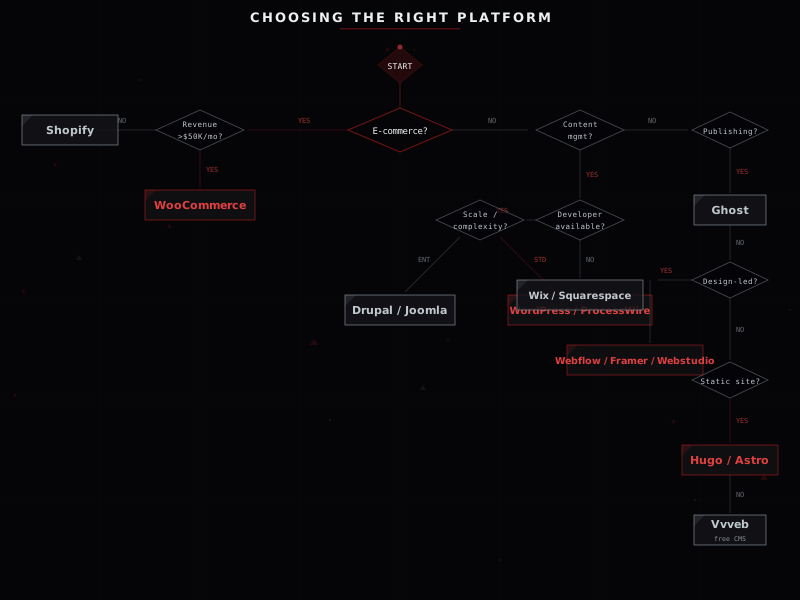
Every platform recommendation starts with five questions. Budget. Timeline. Technical capacity. Content requirements. Growth trajectory. The answers map directly to a platform.
Budget under $2,000 and no developer on the team? Wix or Squarespace. The ceiling is lower than a custom build, but the site goes live in days, not months. Squarespace if visual quality matters most. Wix if built-in marketing tools matter most.
E-commerce with growth ambitions? WooCommerce under $50,000 per month in revenue, Shopify above. The crossover point accounts for transaction fees, hosting costs, and operational overhead. We covered the math in detail in our WordPress article.
Content site or business website with a developer available? WordPress or Astro. WordPress when the client needs to update content independently. Astro when performance and cost are the top priorities and the team is comfortable with code-based workflows. Our LMS project is a clear example of WordPress being the right call for a complex, content-driven application.
Enterprise-grade content with strict governance? Drupal. When the project involves complex content relationships, dozens of user roles, and institutional compliance requirements, Drupal is the correct tool. Need built-in multilingual and granular permissions without plugins? Joomla. Developer who wants a CMS with zero opinions about the front-end? ProcessWire.
Design-led marketing site? Webflow. The visual CSS editor eliminates the gap between design and production. Framer if the project is animation-heavy and scope-limited. Want Webflow's visual approach without the vendor lock-in? Webstudio is the open-source alternative worth evaluating. Whichever platform you ship on, if the goal is leads or sales, you will eventually need Google Ads management to drive qualified traffic to it.
Publishing, newsletters, or membership business? Ghost. The built-in subscription and newsletter infrastructure means zero plugin management for the core business model.
Multi-channel content delivery across web, mobile, and third-party integrations? Strapi or another headless CMS. API-first architecture is the only approach that scales across channels without duplicating content.
Self-hosted e-commerce on a zero budget? Vvveb. Free, open-source, with built-in e-commerce and a genuine WYSIWYG editor. Static site with thousands of pages? Hugo. Build times measured in seconds, not minutes.
Frequently asked questions
What is the best WordPress alternative for small business?
It depends on your needs. Wix offers the simplest all-in-one setup with AI-assisted site building. Shopify is best if your primary business is selling products online. Squarespace provides beautiful templates for service businesses and creatives. Vvveb is a compelling free, open-source option with built-in e-commerce for teams that want full ownership without monthly fees. For maximum flexibility and ecosystem depth, WordPress itself remains the strongest choice - the alternatives win on simplicity, not capability.
Is Webflow better than WordPress?
For designer-led marketing sites without complex CMS requirements, Webflow can be faster to build and deploy. For content-heavy sites, e-commerce, or projects requiring extensive customization, WordPress remains significantly more capable. Webflow pricing also scales poorly - e-commerce plans reach $212 per month before you factor in per-transaction costs.
Should I switch from WordPress to Shopify?
Only if your primary business is product e-commerce and monthly revenue exceeds roughly $50,000. Below that threshold, WooCommerce typically wins on cost due to zero platform transaction fees. Above it, Shopify's managed infrastructure and checkout optimization can justify the premium. Consider the total cost of ownership: monthly plan, transaction fees, app subscriptions, and customization limitations.
What is the fastest CMS in 2026?
Static site generators like Astro and Hugo deliver the fastest page loads with typical Lighthouse scores of 95 to 100. Hugo's Go-based build engine is particularly fast for sites with thousands of pages. Among traditional CMS platforms, Ghost consistently scores highest at 90 to 98. ProcessWire also performs well (75 to 95) because the developer controls every byte of output. WordPress performance varies widely (60 to 90) depending on hosting quality, optimization, and plugin load.
Can I use AI to build a website without WordPress?
Yes. Wix, Framer, and Squarespace all offer AI-assisted site building. However, AI-generated sites still require human review for brand accuracy, SEO optimization, and conversion design. AI accelerates the starting point but does not replace the expertise needed to build a site that actually converts visitors into customers.
Not sure which platform fits your project?
We build on WordPress, Astro, Shopify, and custom stacks. Tell us what you need and we will recommend the right tool - no lock-in, no bias.

